
Run action

Note: The path is a placeholder. The actual path is determined by the configuration of the app component.

The request made when an action is triggered. Rule actions in rules containing a "Task added to this project" trigger have a 2 minute delay for newly created tasks in that project. This is to provide time for the creating user to fill out task details (name, description, etc.) before the rule action is triggered.

An app server must be hosted in order for rule actions to function. For a brief list of popular hosting options, see hosting.
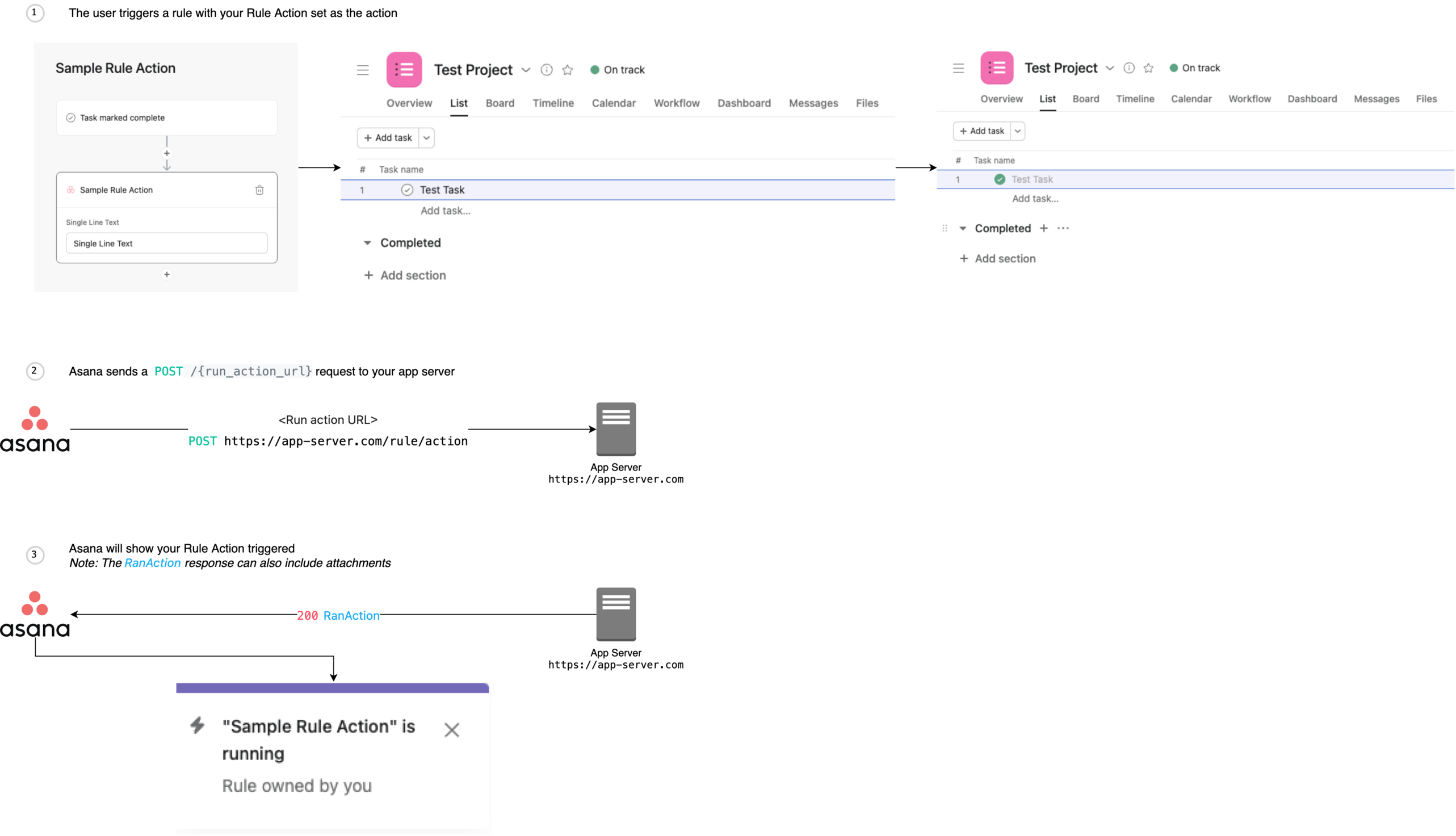
App components rule run action request flow

Body Params

Request to notify of an action running.

string

The time (in ISO 8601 date format) when the request should expire.

string

The user GID this hook is coming from.

string

The workspace GID this hook is coming from.

string

The project GID this hook is coming from.

string

The ID of the target object that the rule action is acting on. Currently, this value is always a task GID.

string

The action ID generated from rule creation.

string

The ID from the configuration used to create the rule action.

string
required

A unique key associated with the "run action" request. App servers should use this key to implement idempotency.

Responses

410

Gone

Language
URL
LoadingLoading…
Response
Choose an example:
application/json